Base HRMS Web Portal

Case Study: Base HRMS by Nullplex – End-to-End HR Management Platform

Project Overview

Base HRMS, developed by Nullplex, is a comprehensive Human Resource Management System designed to digitize and streamline the entire employee lifecycle, including employee management, payroll, attendance, recruitment, leave management, and employee self-service operations. The objective of this Base HRMS solution was to replace fragmented HR tools and manual spreadsheet-based processes with a centralized, scalable, and user-friendly platform that improves operational efficiency and data accuracy.

Our team at Nullplex handled the complete project lifecycle, including research, UI/UX design, frontend development, and system implementation, ensuring a seamless integration of usability, performance, and scalability.

Problem Statement

Organizations often manage HR operations using multiple disconnected systems for payroll, attendance, recruitment, and employee records. This results in data duplication, reporting challenges, and inefficient workflows. The client required a unified HRMS platform capable of consolidating all HR operations into a single system while maintaining a clean user interface and ensuring easy adoption across departments. The Nullplex HRMS approach focused on simplifying complex HR processes while maintaining enterprise-level scalability.

UI/UX Design Approach

The Nullplex UI/UX team designed a clean, structured dashboard that provides quick access to all HR modules such as Employees, Payroll & Statutory, Attendance, Recruitment, LMS, Leave Management, and Employee Self-Service. The navigation architecture was carefully planned to minimize user effort and reduce the number of steps required to perform daily HR operations.

Data-heavy screens were designed using structured tables with pagination, filtering, and quick-action controls for editing, viewing, or deleting records. Color-coded status indicators such as Active, Inactive, Approved, and Pending were implemented to help HR managers quickly identify important updates. Prominent action buttons like “Import Data,” “Export Data,” and “Add New Record” improved workflow speed and reduced manual processing time. The Nullplex design system ensured consistent typography, spacing, and component usage across all modules for a unified user experience.

Development Implementation

From a development perspective, Nullplex implemented a modular architecture using reusable frontend components, allowing tables, forms, and dashboards to be reused across different HR modules. This significantly reduced development time and ensured long-term maintainability. Responsive layouts were implemented to ensure smooth performance across desktop and tablet environments.

Backend integration enabled real-time updates across payroll, attendance, and employee records, ensuring data synchronization throughout the platform. Bulk import/export functionality was added to support organizations managing large employee databases. Role-based access control was also implemented by Nullplex to ensure secure data visibility for Admins, HR Managers, and Employees.

Results and Impact

The platform successfully transformed manual HR processes into an automated digital workflow. HR teams experienced faster employee data handling, simplified payroll operations, improved attendance tracking, and better reporting visibility. The intuitive interface significantly reduced training time and improved adoption across departments.

Overall, this Base HRMS case study demonstrates how strategic UI/UX design combined with scalable development practices can create a powerful enterprise HR platform that enhances productivity, ensures data accuracy, and enables organizations to manage their workforce efficiently through a modern, centralized digital ecosystem.

SaleDrive Web Portal

Case Study: Saledrive – AI-Powered Marketing Campaign Platform for Real Estate

Project Overview

Saledrive is an AI-powered marketing campaign management platform built specifically for real estate businesses to automate lead generation, campaign optimization, and customer engagement. The goal of the project was to create a centralized marketing system where real estate agencies could manage campaigns, track performance, handle leads, and receive AI-generated campaign recommendations to improve conversion rates. Our team was responsible for the complete product experience, including UI/UX research, user flow design, frontend interface development, backend system architecture, and user management implementation.

Problem Statement

Real estate businesses often run marketing campaigns across multiple platforms such as social media ads, listing promotions, and email campaigns, but they lack a unified system to manage campaigns efficiently. Manual tracking of leads, campaign performance, and customer engagement leads to inefficient marketing spend and missed conversion opportunities. The client required a smart marketing automation platform capable of centralizing campaign operations while leveraging AI to generate optimized campaign suggestions.

UI/UX Design Approach

Our design process focused on building a clean, conversion-oriented interface that simplifies campaign creation and monitoring. We designed intuitive login and onboarding experiences to ensure quick adoption for marketing teams. Campaign dashboards were structured to provide real-time visibility into performance metrics such as leads generated, engagement rate, and campaign reach.

Special emphasis was placed on creating guided workflows that allow users to create campaigns step-by-step, from selecting property listings to defining target audiences and budgets. AI recommendation sections were integrated directly into the campaign workflow, enabling users to receive automated suggestions for audience targeting, ad creatives, and performance optimization. Consistent design systems, reusable UI components, and responsive layouts ensured seamless usability across devices.

Development and Backend Implementation
From a development perspective, the Saledrive platform was built with scalable backend architecture designed to handle campaign data, lead records, and performance analytics in real time. A robust user management system was implemented, allowing role-based access control for administrators, marketing managers, and sales teams. This ensured secure access to campaign dashboards and lead information.

Backend integrations enabled automated campaign tracking and performance analysis, while AI modules processed campaign data to generate intelligent optimization suggestions. The system was structured using modular APIs, allowing future integration with external advertising platforms and CRM systems. Performance optimization techniques were implemented to ensure fast dashboard loading even with large campaign datasets.

Results and Impact

The Saledrive platform significantly improved marketing efficiency for real estate businesses by consolidating campaign management, lead tracking, and performance analytics into a single intelligent system. Marketing teams were able to launch campaigns faster, track results in real time, and use AI-generated insights to optimize ad performance and increase lead conversion rates.

By combining strategic UI/UX design, scalable backend development, and AI-driven automation, Saledrive successfully transformed traditional real estate marketing workflows into a data-driven, automated ecosystem that enhances productivity, reduces manual effort, and maximizes marketing ROI for real estate organizations.

A-MAP Warranty Application – Complete Claim & QC Inspection Management Solution Case Study 2026

Case Study: A-MAP Warranty Application – Complete Claim & QC Inspection Management Solution Case Study 2026

Project Overview

The A-MAP Warranty Application is a mobile-based warranty claim and quality inspection management platform designed to streamline customer registration, claim submission, inspection workflows, and automated report generation. The primary goal of the project was to digitize the entire warranty claim lifecycle, enabling faster claim processing, improved inspection accuracy, and transparent communication between customers, inspectors, and administrators. Our team was responsible for UI/UX design, user flow planning, mobile app interface development, backend integration, and reporting automation.

Problem Statement

Warranty claim handling and inspection processes were previously managed using manual forms, spreadsheets, and disconnected systems, resulting in delays, tracking issues, and data inconsistencies. Customers faced difficulties registering claims and tracking claim status, while inspection teams lacked a centralized system for managing QC reports. The organization required a mobile-first solution capable of simplifying claim submission, inspection verification, and report generation while ensuring secure data handling and real-time updates.

UI/UX Design Approach

The user experience was designed with a focus on simplicity, speed, and field usability. The application dashboard provides quick access to key features such as QR/Barcode scanning, manual claim entry, inspection history, and claim tracking. Guided step-by-step registration and claim submission flows were created to ensure accurate data entry while minimizing user effort.

Clear status indicators, structured claim cards, and notification alerts were integrated to provide real-time updates on claim progress. The interface design ensures that inspectors and service teams can quickly perform inspections, upload photos or documents, and complete verification tasks directly from the mobile device without relying on manual paperwork.

Development & Backend Implementation

From a development perspective, the A-MAP Warranty Application was built with a secure authentication system to protect customer and claim data. A scalable backend architecture was implemented to manage customer registrations, claim records, inspection logs, and automated PDF report generation. Role-based access controls allow different user types—customers, inspectors, service centers, and administrators—to access features relevant to their responsibilities.

Automated workflows trigger notifications for claim submission, inspection scheduling, approval updates, and report generation, ensuring a fully digital and systematic claim processing lifecycle.

Results and Impact

The A-MAP Warranty Application significantly improved claim processing efficiency by digitizing registration, claim submission, inspection tracking, and reporting workflows. Customers can now submit warranty claims quickly and monitor their status in real time, while inspection teams benefit from faster QC verification and automated report generation. The platform created a structured, transparent, and scalable warranty management ecosystem that enhances operational productivity, reduces manual effort, and improves overall service quality.

Doctor Appointment & Order Management Application – Complete Field Force Management Solution 2026

Case Study: MR Doctor Appointment & Order Management Application

Project Overview

The MR Doctor Appointment & Order Management Application was developed to streamline the daily workflow of Medical Representatives (MRs) by enabling efficient doctor appointment scheduling, visit tracking, order management, and task assignments managed by the super admin. The platform was designed to digitize field-force operations, allowing pharmaceutical and healthcare organizations to monitor MR activities, manage doctor interactions, and improve productivity through a centralized mobile solution. Our team handled the complete project lifecycle, including UI/UX design, workflow architecture, mobile application interface development, and backend system integration.

Problem Statement

In many healthcare and pharmaceutical organizations, medical representatives traditionally manage doctor visits, appointment schedules, and order collections manually using spreadsheets, paper-based forms, or offline reporting systems. These outdated methods often lead to incomplete visit tracking, delayed reporting, inaccurate data entries, and limited visibility for management teams. Supervisors and administrators also face challenges in assigning doctors, scheduling visits, and monitoring MR performance in real time. The organization required a structured digital platform where super administrators could assign tasks, doctors, and schedules to MRs while tracking appointment completion, visit performance, and order submissions centrally.

UI/UX Design Approach

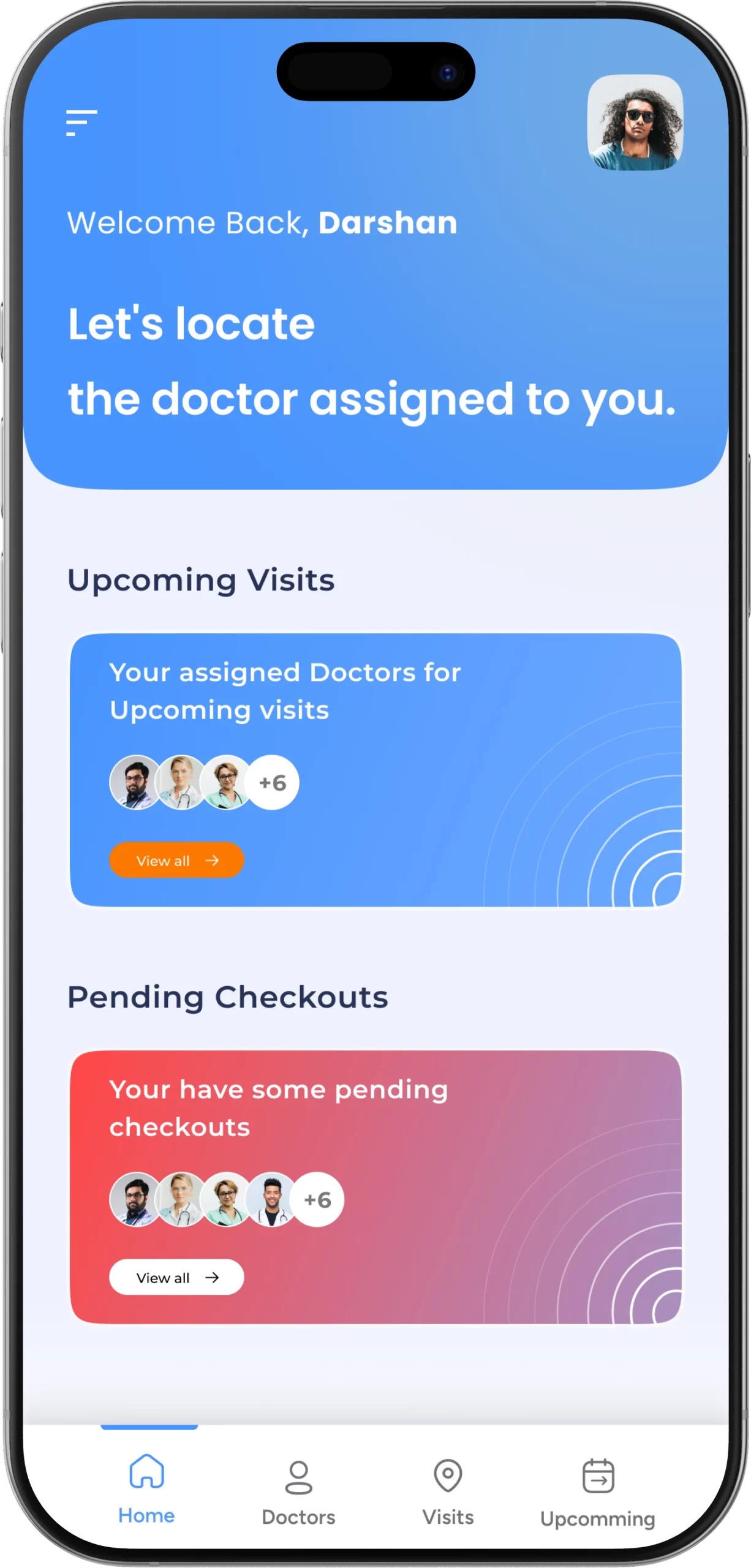
The user experience was designed with a mobile-first approach, prioritizing simplicity, clarity, and field usability for medical representatives working on the move. The dashboard layout provides an instant overview of assigned doctors, upcoming visits, pending checkouts, and quick navigation to key modules such as Doctors, Visits, Orders, and Upcoming Appointments. Card-based interface components were implemented to display scheduled visits and pending tasks in a visually structured manner, enabling MRs to quickly understand their daily priorities.

Clear visual indicators highlight upcoming tasks, completed visits, and pending actions, ensuring that representatives can track their workflow efficiently. Quick-access navigation was designed to reduce the number of steps required to locate assigned doctors, update visit status, and submit orders. A consistent design system with standardized typography, spacing, and color patterns was implemented across the application to ensure usability, readability, and interface consistency on multiple mobile devices.

Development & Backend Implementation

From a development perspective, the application was built using a scalable backend architecture designed to manage doctor databases, MR assignments, visit schedules, and order records efficiently. A role-based access control system was implemented, allowing super administrators to assign doctors, create visit schedules, monitor MR activities, and analyze performance metrics, while MR users can view assigned tasks, log visit updates, and submit order details directly from the mobile application.

Real-time data synchronization ensures that any updates made by administrators are instantly reflected on the MR dashboard, enabling seamless coordination between field teams and management. Integrated reporting modules allow organizations to track visit completion rates, doctor engagement, appointment schedules, and order performance for better operational planning and decision-making.

Results and Impact

The MR Doctor Appointment & Order Management Application significantly improved field-force efficiency by digitizing appointment scheduling, visit tracking, and order submission processes. Medical representatives can now manage their daily visit schedules more effectively, while administrators gain centralized visibility into MR activities, doctor interactions, and performance metrics. The system reduced manual reporting efforts, improved accountability, enhanced scheduling accuracy, and created a structured digital workflow that increases productivity and operational transparency across healthcare sales and field-force management teams.

Chemical Updates – Real-Time Chemical & Polymer Price Intelligence Mobile App 2026

Chemical Updates – Real-Time Chemical & Polymer Price Intelligence Mobile App 2026

Project Overview

Chemical Updates is a real-time chemical and polymer price intelligence mobile application designed to help industry professionals stay informed about market price fluctuations, trends, and location-based pricing updates. The platform was created to provide buyers, sellers, distributors, and manufacturers with instant access to accurate pricing insights, enabling faster and more strategic decision-making. Our team handled the complete development lifecycle, including UI/UX design, workflow architecture, mobile interface development, backend data integration, and performance optimization.

Problem Statement

Chemical Updates, Chemical and polymer markets are highly dynamic, with prices frequently changing due to global supply chain conditions, raw material availability, logistics costs, and regional demand. Many organizations rely on delayed reports, manual updates, or fragmented information sources, resulting in slow response times and inefficient purchasing decisions. The client required a centralized mobile platform capable of delivering real-time pricing updates, historical price analysis, and customized notifications tailored to specific geographic markets.

UI/UX Design Approach

Chemical Updates application was designed using a mobile-first approach focused on data clarity, simplicity, and accessibility. The dashboard provides a quick overview of trending price updates, subscription insights, and top market news, allowing users to immediately understand the latest market movements. Dedicated sections for Chemicals and Polymers enable users to browse pricing information by category, while structured card-based layouts display price highlights and news updates in an organized visual format.

Location-based customization ensures that users receive region-specific pricing insights relevant to their business operations. Alert notifications were integrated to inform users about sudden price changes or important market developments. Consistent typography, spacing, and navigation structures were implemented to ensure usability across multiple mobile devices.

Development & Backend Implementation

From a development perspective, the platform was built with a scalable backend architecture designed to handle continuous data updates from multiple pricing sources. Real-time synchronization ensures that users receive the latest pricing information instantly. Historical pricing modules allow users to analyze previous market trends and evaluate price movements over time for better forecasting and purchasing strategies.

Subscription management, notification systems, and user preference controls were integrated to allow customized data access and alert settings. Performance optimization techniques were implemented to ensure fast dashboard loading and smooth data visualization even when handling large datasets across multiple chemical categories.

Results and Impact

The Chemical Updates mobile application significantly improved access to chemical and polymer pricing intelligence by providing real-time, location-based market insights in a single platform. Industry professionals can now monitor market trends, track price fluctuations, and receive timely alerts, enabling faster and more informed business decisions. The platform reduced reliance on manual data tracking, enhanced decision-making accuracy, and created a structured digital ecosystem that helps organizations stay competitive in the rapidly changing chemical and polymer markets.

Pan India Empty Depot Application – Advanced Marine Depot Management Solution 2026

Pan India Empty Depot Application – Advanced Marine Depot Management Solution 2026

Project Overview

The Pan India Empty Depot Application, developed for Panindia Marine Service Pvt. Ltd., is a powerful in-house digital platform designed to modernize and automate marine depot operations. The application was created to streamline critical workflows such as container gate-in, gate-out processing, container inspection (survey), and container search management, enabling depot operators to manage operations efficiently through a centralized mobile-based system. The primary objective of this project was to eliminate manual paperwork, reduce operational errors, and create a real-time container tracking ecosystem that enhances productivity across depot operations.

Our team was responsible for the complete product lifecycle, including UI/UX design, operational workflow planning, mobile application development, backend system architecture, and custom in-house API integration, ensuring the platform is scalable, secure, and performance optimized for high-volume depot environments.

Industry Challenges

Marine container depot operations traditionally rely on manual documentation, paper-based inspection forms, and disconnected tracking systems. These outdated processes create operational challenges such as delayed gate processing, inaccurate container inspection records, time-consuming container searches, and limited visibility for depot management teams. Additionally, manual calculation of inspection parameters and container movement records often results in data inconsistencies and human errors, affecting operational accuracy and compliance requirements.

The organization required a smart digital solution capable of handling container movement tracking, automated inspection recording, image-based documentation, and centralized database management, all within a secure and easy-to-use mobile platform accessible by depot staff in real time.

Solution Approach

The Pan India Empty Depot Application was developed as a fully integrated depot management solution that digitizes container operations and provides instant access to operational data. The application features intelligent auto-calculation algorithms that automatically compute inspection parameters, minimizing the risk of manual entry errors and ensuring consistent operational accuracy. Depot staff can quickly record container inspections using guided digital survey forms, significantly reducing inspection processing time.

Marine Depot Management The platform also includes high-resolution image upload functionality, allowing operators to capture container condition photographs instantly during inspection and store them securely on the in-house server. This digital documentation process eliminates the need for manual paperwork while ensuring accurate inspection records are available for future reference.

Marine Depot Management A powerful container search engine was implemented within the application to enable users to locate container records instantly using container numbers, movement history, or inspection details. With 24/7 real-time database access, depot operators and management teams can retrieve container information at any time, ensuring operational continuity and improved tracking visibility.

UI/UX Design Strategy

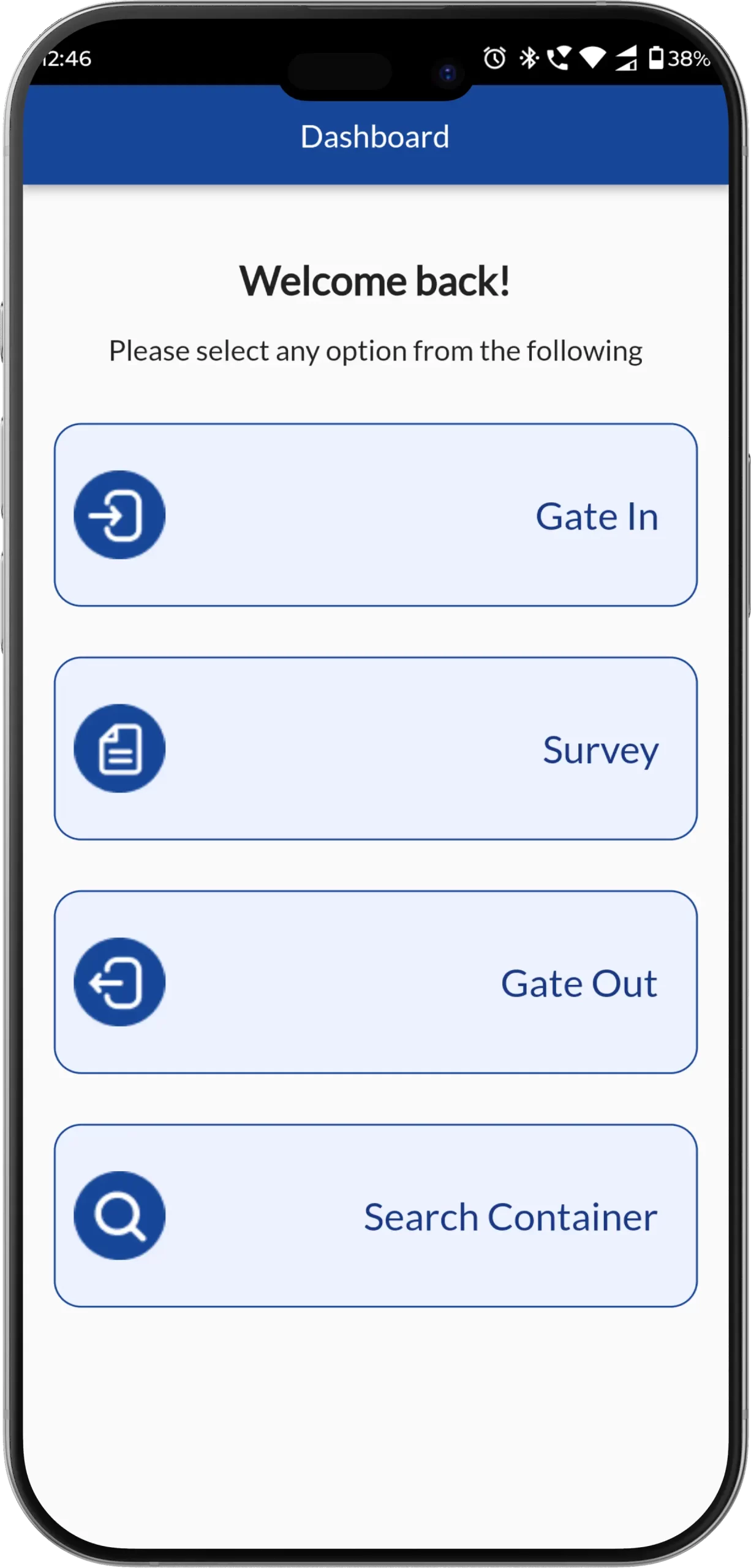
The application interface was designed using a mobile-first usability approach, ensuring depot staff can perform tasks quickly in fast-paced yard environments. The dashboard provides quick-access modules such as Gate In, Gate Out, Survey, and Container Search, enabling users to complete daily operations with minimal navigation. Large action buttons, intuitive icons, and structured layout patterns were implemented to improve accessibility and usability for operational teams working on-site.

Clear visual workflows guide users through inspection recording, container movement logging, and documentation uploads, ensuring operational tasks are completed accurately and efficiently. The design system also maintains consistent typography, spacing, and color hierarchy, allowing users to navigate the application easily even during high operational workloads.

Development & Technology Implementation

From a technical perspective, the system was built on a secure in-house server infrastructure, ensuring high-level data protection, continuous system availability, and fast data retrieval performance. Custom-built in-house APIs integrate inspection workflows, container movement tracking, and operational records into a unified centralized system, allowing seamless synchronization between mobile devices and backend servers.

Performance optimization techniques were implemented to ensure smooth application performance even when handling large-scale container datasets across multiple depot operations. The scalable architecture allows the platform to expand easily as depot operational requirements grow.

Results and Business Impact

Marine Depot Management The deployment of the Pan India Empty Depot Application significantly improved operational efficiency by digitizing container inspection, movement tracking, and documentation processes. Depot teams can now process gate-in and gate-out operations faster, track container movements instantly, and maintain accurate inspection records without relying on manual paperwork. Automated calculations reduced operational errors, while centralized container data access improved management visibility and reporting accuracy.

Marine Depot Management Overall, the application transformed traditional depot workflows into a real-time digital container management ecosystem, enhancing container handling speed, reducing operational delays, improving inspection accuracy, and enabling smarter operational decision-making. The solution provides a strong technological foundation for future innovation, ensuring that Panindia Marine Service Pvt. Ltd. continues to operate at the forefront of digital transformation in marine depot management.

PH Diagnostics – Appointment & Sample Collection Management App

Case Study: PH Diagnostics – Appointment & Sample Collection Management App

Project Overview

The PH Diagnostics Diagnostics Technician Application is a comprehensive mobile solution designed to streamline diagnostic service operations by enabling efficient appointment scheduling, visit tracking, home sample collection, and payment processing. The goal of the Diagnostics Technician Application was to create a centralized digital platform that improves operational efficiency, enhances service coordination, and provides real-time visibility into appointment and service workflows. By implementing the Diagnostics Technician Application, diagnostic service teams can manage daily assignments, track visit progress, and update service records seamlessly through a mobile-first system. Our team was responsible for the complete lifecycle of the Diagnostics Technician Application, including UI/UX design, workflow architecture, mobile application development, backend integration, and performance optimization.

Problem Statement

Diagnostic organizations often rely on manual scheduling systems, fragmented reporting tools, and delayed communication processes that create operational inefficiencies. Without a structured Diagnostics Technician Application, managing appointment assignments, tracking service completion, and maintaining accurate sample collection records becomes time-consuming and error-prone. Additionally, management teams face challenges in monitoring service performance and appointment completion in real time. The organization required a scalable Diagnostics Technician Application capable of assigning appointments instantly, tracking visit activities, recording sample collection details, and managing payment workflows within a single digital system.

UI/UX Design Approach

The Diagnostics Technician Application was designed using a mobile-first user experience approach that prioritizes simplicity, speed, and usability for field operations. The dashboard of the Diagnostics Technician Application provides a clear overview of assigned appointments, pending requests, completed visits, and service status indicators, enabling users to manage workloads efficiently. Appointment cards within the Diagnostics Technician Application display essential patient information such as name, contact number, service address, appointment date, and service time, ensuring smooth visit preparation.

Quick-action buttons such as Accept, Reject, On-Spot Processing, and Drop Status enable users to update appointment progress instantly within the Application, reducing reporting delays. Integrated map navigation functionality further enhances the Application, allowing users to reach service locations efficiently and optimize travel routes. A structured layout, consistent visual hierarchy, and intuitive navigation ensure that the Application remains easy to use even during high-volume service operations.

Development & Backend Implementation

From a technical perspective, the Diagnostics Technician Application was built using a scalable backend architecture capable of managing appointment records, patient data, service logs, and payment workflows efficiently. Role-based access control ensures that administrators can assign appointments and monitor operational performance, while assigned users can update visit status, record sample collection details, and confirm appointment completion directly through the Diagnostics Technician Application. Real-time data synchronization ensures that all updates performed within the Application are instantly reflected across the central system, improving coordination between management teams and service staff.

Secure data handling mechanisms were implemented within the Diagnostics Technician Application to protect patient information while ensuring continuous system availability. Performance optimization techniques were also applied to ensure smooth application performance even when handling large volumes of appointment and service data.

Results and Impact

The implementation of the Diagnostics Technician Application significantly improved operational efficiency by digitizing appointment scheduling, service tracking, and sample collection workflows. Service teams using the Application can now manage appointments more effectively, update service status in real time, and maintain accurate digital records without relying on manual processes. The Application enhanced operational visibility, reduced reporting delays, improved service accountability, and created a structured workflow that increases productivity and service accuracy across diagnostic operations.

Overall, the Diagnostics Technician Application provides a scalable digital infrastructure that enables diagnostic organizations to deliver faster, more organized, and more reliable service experiences while maintaining accurate operational reporting and efficient appointment management.

Suburban Diagnostics – Diagnostic Mobile App for Lab Test Booking, Reports & Health Management

Suburban Diagnostics – Diagnostic Mobile App for Lab Test Booking, Reports & Health Management

Project Overview

Suburban Diagnostics is one of India’s most trusted diagnostic service providers, offering a wide range of pathology and radiology services backed by accuracy, speed, and reliability. To enhance digital accessibility and improve patient experience, Suburban Diagnostics introduced a modern Diagnostic Mobile App designed to simplify lab test booking, report access, and health record management.

The primary objective of the Diagnostic Mobile App was to create a centralized digital platform that enables patients to book lab tests, schedule appointments, access diagnostic reports, and manage personal health records seamlessly. By implementing the Diagnostic Mobile App, Suburban Diagnostics aimed to reduce manual dependency, improve service efficiency, and deliver a convenient healthcare experience across mobile devices. Our team handled UI/UX design, workflow architecture, mobile application development, backend integration, and performance optimization to deliver a scalable Diagnostic Mobile App.

Industry Challenges

Before adopting the Diagnostic Mobile App, patients relied on traditional booking methods such as phone calls, physical visits to diagnostic centers, and delayed report collection processes. These manual workflows resulted in longer turnaround times, limited access to health records, and inconvenience for patients managing frequent diagnostic tests.

Patients faced challenges in tracking appointment status, accessing reports on time, and maintaining a centralized medical history. From an operational perspective, managing high booking volumes, report distribution, and appointment coordination across multiple locations was time-consuming. Suburban Diagnostics required a secure and scalable Diagnostic Mobile App capable of digitizing the patient journey while maintaining data accuracy and regulatory compliance.

UI/UX Design Strategy

The Diagnostic Mobile App was designed using a mobile-first usability strategy focused on simplicity, accessibility, and patient convenience. The application dashboard provides structured access to essential features such as Book Lab Tests, View Reports, Manage Appointments, and Health Records, allowing users to navigate easily without complexity.

The test booking workflow was optimized to reduce friction, enabling users to search for diagnostic tests, select home collection or lab visit options, choose preferred time slots, and complete bookings within a few steps. Clear typography, intuitive icons, and well-structured layouts ensure that the Diagnostic Mobile App remains easy to use across all age groups.

Report access screens were designed to allow users to view, download, and share diagnostic reports securely. Notification indicators and alerts inform users about appointment confirmations, technician arrival updates, and report availability. The design system emphasizes readability, consistent navigation patterns, and accessibility, ensuring a smooth and reassuring healthcare experience.

Development & Backend Implementation

From a development perspective, the Diagnostic Mobile App was built using a scalable backend architecture capable of managing high user traffic, appointment scheduling, diagnostic data, and report generation efficiently. Secure APIs were integrated to synchronize lab systems with the mobile application, ensuring real-time availability of reports once tests are processed.

Role-based access control ensures that patient data remains protected while allowing administrators to manage bookings, reports, and operational workflows. Real-time data synchronization ensures that appointment updates, report uploads, and notifications are instantly reflected within the Diagnostic Mobile App.

Secure cloud-based infrastructure and data encryption techniques were implemented to comply with healthcare data privacy standards. Performance optimization strategies ensure fast loading times and reliable access even during peak usage periods. The modular backend architecture allows future expansion, including additional health services and advanced analytics features.

Results and Impact

The implementation of the Suburban Diagnostics Diagnostic Mobile App significantly improved patient engagement and operational efficiency. Patients can now book lab tests easily, access reports instantly, and manage their health records digitally without visiting diagnostic centers unnecessarily.

The Diagnostic Mobile App reduced administrative workload by automating appointment confirmations, reminders, and report delivery processes. Operational visibility improved through centralized dashboards, enabling better resource planning and service optimization.

Overall, the Diagnostic Mobile App enhanced patient satisfaction, reduced turnaround times, and strengthened Suburban Diagnostics’ position as a digitally advanced healthcare provider. The platform created a scalable digital foundation that supports continuous service improvement, increased accessibility, and long-term digital transformation in diagnostic healthcare services.

Swasth Health Companion – Digital Health Records App for Smart Family Health Management

Swasth Health Companion – Digital Health Records App for Smart Family Health Management

Project Overview

Swasth Health Companion is a comprehensive Digital Health Records App developed by a team of doctors and information technology experts with a shared vision of empowering individuals to take control of their own health. The primary objective of the Digital Health Records App was to create a centralized platform where individuals and families can securely manage, track, and access their medical records anytime, anywhere.

The Digital Health Records App enables users to store medical history, lab reports, prescriptions, health measurements, and personal health data in one secure location. Designed for both web and mobile platforms, Swasth Health Companion ensures that critical health information is always accessible, whether during routine doctor visits or emergency situations. Our team handled UI/UX design, workflow architecture, application development, and backend integration to build a scalable and user-friendly Digital Health Records App.

Industry Challenges

Many individuals maintain physical files containing lab reports, prescriptions, and medical history records. Over time, these documents become scattered, misplaced, or even discarded. This fragmented approach to health data management creates difficulties when patients need historical records for medical consultations.

Without a structured Digital Health Records App, it becomes challenging to track long-term health trends such as blood pressure patterns, blood sugar levels, and medication history. Healthcare professionals also face limitations when patients cannot provide comprehensive data during diagnosis. The need for a centralized Digital Health Records App became essential to simplify record keeping, improve accessibility, and enable informed medical decision-making.

UI/UX Design Strategy

The Digital Health Records App was designed with simplicity and clarity as core principles. The dashboard provides easy navigation to essential modules such as health measurements, medical history, lab reports, and profile management. The interface ensures that users of all age groups can easily add, edit, and view medical records without technical complexity.

The Digital Health Records App allows users to record basic health details such as blood group, date of birth, height, and weight. Health measurements including blood pressure and blood sugar can be tracked visually using graphs and timelines. The timeline view provides a structured chronological overview of major medical events, helping users understand their health progression clearly.

Users can securely upload lab test reports and medical documents as attachments within the Digital Health Records App. Records can be viewed in both timeline and table formats, giving flexibility based on user preference. The application also includes a secure sharing feature that allows users to share selected medical records with trusted doctors when needed.

Development & Backend Implementation

From a technical standpoint, the Digital Health Records App was built using a secure cloud-based infrastructure to ensure data protection and continuous availability. Role-based access control mechanisms ensure that users maintain full ownership and privacy of their medical data.

Real-time synchronization allows users to access their records across both web and mobile platforms seamlessly. Data encryption and secure authentication protocols were implemented to safeguard sensitive medical information. The modular backend architecture allows the Digital Health Records App to continuously evolve with new feature updates and performance enhancements.

Results and Impact

The implementation of the Swasth Health Companion Digital Health Records App significantly improved how individuals manage and monitor their health data. Users can now digitally organize family medical records, track long-term health measurements, and access comprehensive medical history instantly.

The Digital Health Records App eliminates dependency on physical files, reduces the risk of lost records, and enhances medical consultations by providing complete health data. By enabling individuals to measure, track, and manage their health proactively, Swasth Health Companion supports informed decision-making and long-term wellness management.

Overall, the Digital Health Records App created a structured digital ecosystem that empowers users to stay Swasth by taking control of their health records in a secure, accessible, and intelligent manner.

Career Hire Us
Request Callback

Got An Idea?

Let’s Build It.

Tell us what you need, and our team will guide you from concept to launch with clarity, speed, and expert care.